


One Photo. One Click. Results That Look Like It Was Shot That Way.
What if you could swap your face into any photo — no filters, no setup, no training — and it actually looked like it was shot that way?
- One Photo. One Click. Results That Look Like It Was Shot That Way.
- How to Access Higgsfield Face Swap
- Step 1 — Upload Your Source and Target Images
- Test 1 — AI Avatar Swapped onto a Target Photo
- What You Can Do with Your Result
- How to Edit the Face Swap Result
- Test 2 — Real Photo Swapped onto a Celebrity Image
- How to Animate Your Face Swap into a Video
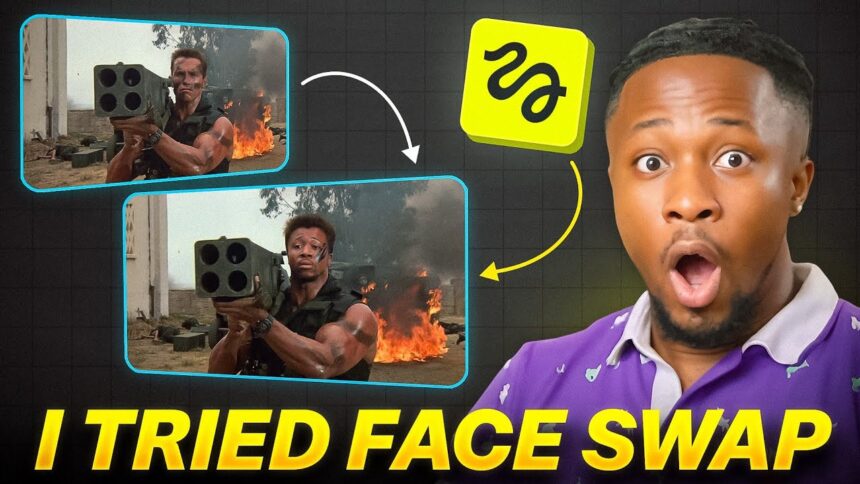
- Test 3 — Model Face Swapped onto Arnold Schwarzenegger (Terminator)
- Full Feature Breakdown
- Animation Model Options
- Higgsfield Pricing
- Creative Use Cases for Higgsfield Face Swap
- Verdict — Can You Tell It’s AI?
This is Higgsfield Face Swap — a new one-click deepfake engine that keeps the lighting, grain, and mood of the target image perfectly intact. You upload your photo, drop it into any image, and in one click, you get back a result that looks captured, not composited.
The technology that used to take Hollywood studios thousands of images and weeks of AI training now takes one photo, one click, done.
For creators, this changes everything:
- One photo shoot can become 50 different looks
- Luxury ads, cinematic portraits, brand visuals — all without reshooting a single frame
🎬 Watch the full tutorial here:
How to Access Higgsfield Face Swap
- Visit higgsfield.ai (link in video description)
- Create a free account and log in
- On the main dashboard, look for “Face Swap by Higgsfield” at the top
- Click on it to open the Face Swap tool
Step 1 — Upload Your Source and Target Images
The Face Swap tool requires two images:
- Source image — the face you want to use (your photo, your AI avatar, or any face)
- Target image — the photo you want to swap the face onto
- Click the source image upload area and upload your photo
- Click the target image upload area and upload the photo you want to swap into
- Click “Face Swap for Free”
Higgsfield processes the swap in seconds and delivers the result.
More EV News

Test 1 — AI Avatar Swapped onto a Target Photo
Source: AI avatar image Target: A selected photo
Result:
The face swap was clean and natural — the avatar’s face integrated seamlessly into the target image with matching lighting and skin tone. No obvious compositing artifacts.
What You Can Do with Your Result
Once the face swap is complete, clicking on the result gives you several options:
- Publish — share it to the Higgsfield community
- Download — save directly to your device
- Modify — edit, animate, make it speak, or regenerate
How to Edit the Face Swap Result
- Click Edit on your result
- Zoom into the area you want to change
- Draw over the section you want to modify
- Type your edit prompt — example: “Make him wear glasses”
- Click Generate
Higgsfield generates several variations of the edited image simultaneously, giving you multiple options to choose from.
Test 2 — Real Photo Swapped onto a Celebrity Image
Source: Real personal photo Target: Photo of DeVito (popular Nigerian musician)
- Upload your real photo as the source
- Upload the celebrity/target image
- Click “Face Swap for Free”
Result:
The face swap integrated the source face onto DeVito’s photo with impressive naturalness — skin tone matched the target’s hand and body well. Everything looked organic, not pasted.
💡 The tool works equally well with real photos as it does with AI avatars — making it useful for both personal branding and creative content.
How to Animate Your Face Swap into a Video
After generating your face swap, you can take it further and turn it into a video:
- Click Animate on your result
- Select an animation model:
- Higgsfield Standard
- Higgsfield Stable
- Higgsfield Turbo (fastest)
- OpenAI Sora 2
- Google Veo
- Kling AI
- Type a motion prompt — example: “Make him wave and kind of walk around”
- Toggle Enhance ON — this lets the AI refine your prompt for better animation results
- Click Generate
The result is a fully animated video of your face-swapped image — moving naturally according to your prompt.
Test 3 — Model Face Swapped onto Arnold Schwarzenegger (Terminator)
Source: Model’s photo Target: Arnold Schwarzenegger’s iconic Terminator image
Result:
The model’s face was placed perfectly onto the Terminator image — with the cinematic lighting and iconic visual style of the original film intact. The result was indistinguishable from a professionally edited image.
💡 After generating, you can also click “Make it Speak” from the Modify options — perfect for lip syncing the face-swapped image to audio, similar to an AI avatar workflow.
Full Feature Breakdown
| Feature | What It Does |
|---|---|
| Face Swap | One-click face replacement in any photo |
| Edit | Draw-to-edit specific areas of the result |
| Animate | Turn the face swap into a video with motion prompts |
| Make it Speak | Lip sync the face swap to audio |
| Regenerate | Generate a fresh new version of the swap |
| Publish | Share to the Higgsfield community |
| Enhance Toggle | AI refines your animation prompt automatically |
Animation Model Options
| Model | Best For |
|---|---|
| Higgsfield Standard | General animations |
| Higgsfield Stable | Consistent, smooth motion |
| Higgsfield Turbo | Fastest generation |
| OpenAI Sora 2 | High quality cinematic motion |
| Google Veo | Realistic video generation |
| Kling AI | Alternative style animations |
Higgsfield Pricing
| Plan | Price (Monthly, Billed Annually) | Best For |
|---|---|---|
| Basic | ~$9/month | Casual creators |
| Standard | ~$18/month | Regular content creators |
| Ultimate | ~$30/month | Professional use |
| Creator | ~$150/month | Heavy/commercial users |
What’s included with any subscription:
When you subscribe to Higgsfield, you don’t just get Face Swap — you get access to their entire suite of AI tools including:
- Higgsfield Animate
- Higgsfield LipSync Studio
- Google Veo3
- Nano Banana Pro
- Seadream 4.0
- Minimax
- HeyLuo
- UGC Factory
- And many more
Creative Use Cases for Higgsfield Face Swap
- Brand content — place yourself into luxury or aspirational settings without a photoshoot
- AI avatar videos — create consistent talking head content from one photo
- Movie/cinematic portraits — place yourself into iconic film scenes
- Product ads — model your own face onto product photos
- Social media content — generate 50 different looks from a single selfie
- Storytelling — create character-consistent AI videos for faceless channels
Verdict — Can You Tell It’s AI?
In most cases — no. The lighting preservation, skin tone matching, and natural integration make Higgsfield Face Swap one of the most convincing one-click face swap tools available right now.
The additional features — editing, animation, lip sync, and multiple model options — make it a complete creative suite rather than just a novelty tool.
For creators, it’s a significant time and cost saver. One good photo can genuinely replace an entire photoshoot worth of content.
Found this helpful? Subscribe to BigWizTV on YouTube for more AI tool reviews and tutorials. Drop a comment — what would you create first with Higgsfield Face Swap?